Sometimes people stop using Cash App because they no longer need it want more privacy or want to create a new account. Whatever the reason may be the process is simple if you know where to look.
- Things to Do Before Deleting Cash App Account
- How to Delete Cash App Account
- How to Delete Cash App Account on iPhone
- How to Delete Cash App Account on Android
- How to Delete Cash App Account Permanently
- How to Delete Cash App Transactions
- How to Deactivate Cash App Card
- Can I Delete My Cash App Account and Make a New One
- Quick Overview of Cash App Account Actions
- Common Problems and Fixes
- Final Thoughts
- FAQs
- How to Delete Cash App Account on iPhone?
- How to delete Cash App account permanently?
- How to delete Cash App account on phone?
- Can I delete my Cash App account and make a new one?
- How to delete Cash App account on Android?
- How to delete Cash App transactions?
- How to deactivate Cash App card?
- Create Cash App account?
Many users search how to delete Cash App account because the delete option is not shown clearly inside the app. Before deleting your account there are a few important things you should do first so you do not lose money or important details.
This guide explains everything in a simple way. Whether you are using iPhone Android or another phone you will find all the answers here.
Things to Do Before Deleting Cash App Account
Before you close your account make sure you do these steps first
- Withdraw any remaining balance
- Transfer money to your bank account
- Sell Bitcoin or stocks if you have any
- Remove linked cards or bank accounts
- Download payment history if needed
- Deactivate your Cash App card
If you skip these steps you may have trouble later because once the account is deleted you cannot access your information easily.
How to Delete Cash App Account
The easiest way is directly through the app.
Step by Step Guide
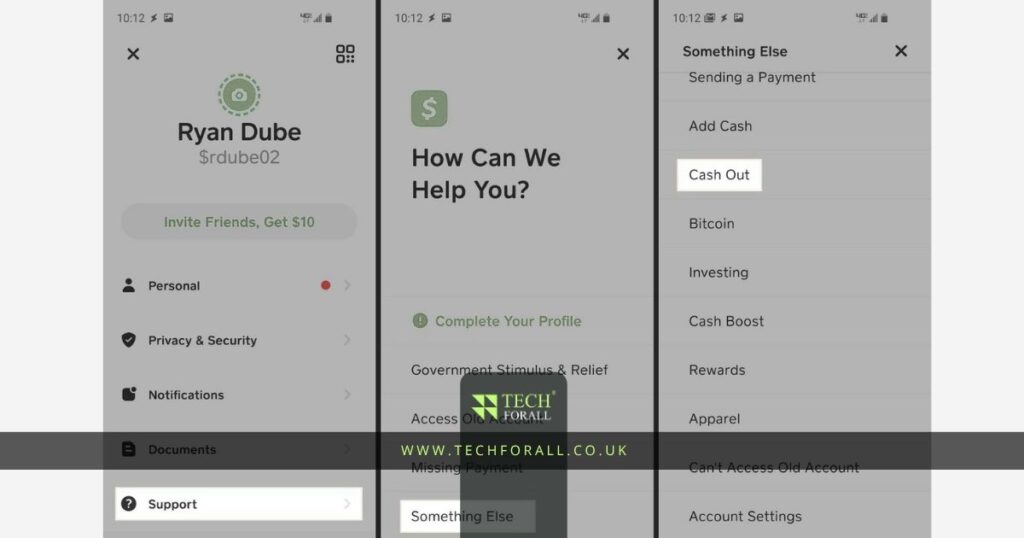
Step 1 Open Cash App on your phone
Step 2 Tap your profile icon in the top corner
Step 3 Scroll down and tap Support
Step 4 Tap Something Else
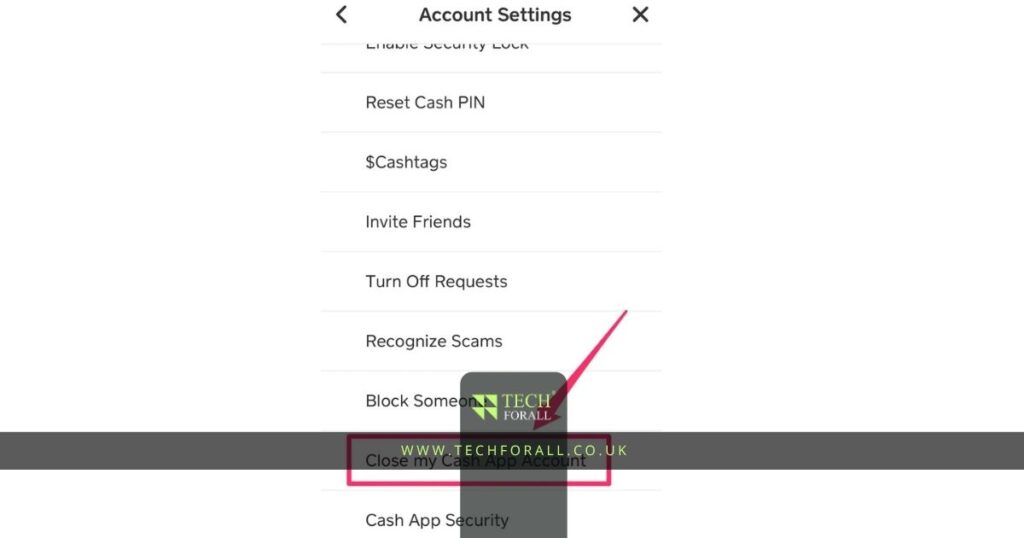
Step 5 Scroll down and select Account Settings
Step 6 Tap Close Your Cash App Account
Step 7 Confirm your choice
After this your Cash App account will be closed permanently.
This is the main method for people searching how to delete a Cash App account how do I delete my Cash App account or how to close Cash App account.
How to Delete Cash App Account on iPhone
If you are using iPhone the process is exactly the same
- Open the app
- Tap profile icon
- Go to Support
- Open Account Settings
- Choose Close Account
This is the easiest method for users searching how to delete Cash App account on iPhone.
How to Delete Cash App Account on Android
Android users follow the same process
- Open Cash App
- Tap profile icon
- Go to Support
- Find Account Settings
- Close account
This works for people searching how to delete Cash App account on Android or how to delete Cash App account on phone.
How to Delete Cash App Account Permanently
If you want to delete your account forever make sure you complete all required steps before closing it.
Important things to remember
- Your payment history may still remain in records
- Closed account cannot be recovered easily
- You may need to create a new email or phone number for another account later
This is helpful for users searching how to delete Cash App account permanently.
You might be interested in: How to Screenshot on iPad Easy and Smart Guide for Beginners
How to Delete Cash App Transactions
Cash App does not allow users to delete transaction history. Payment records stay in the account for security reasons.
However you can
- Close the account
- Hide old notifications
- Create a new account if needed
This answers the common search about how to delete Cash App transactions.
How to Deactivate Cash App Card
If you have a Cash App card and no longer want to use it
- Open Cash App
- Tap Cash Card
- Select Card Settings
- Tap Report Card Lost or Disable Card
This will stop the card from being used.
Can I Delete My Cash App Account and Make a New One
Yes you can create a new account after deleting the old one.
However
- You may need a different email
- You may need a different phone number
- Make sure old account is fully closed first
This is useful if you want a fresh start or a new profile.
Quick Overview of Cash App Account Actions
| Action | Possible | Difficulty |
|---|---|---|
| Delete account | Yes | Easy |
| Delete transactions | No | Not possible |
| Deactivate card | Yes | Easy |
| Create new account | Yes | Easy |
Common Problems and Fixes
Cannot find close account option
- Update the app
- Go to Support then Account Settings
Still have money in account
- Withdraw it before closing
Card still active
- Disable card before deleting account
Cannot create new account
- Use a different phone number or email
Final Thoughts
Now you know how to delete Cash App account in a simple way. The process is not difficult but you should make sure your balance cards and linked accounts are handled first.
Once your account is deleted you may not be able to recover it easily so always check everything before confirming.
If someone asks how to close Cash App account or how do I delete my Cash App account you can now guide them clearly. Just follow the steps and the account will be closed safely.
That is all you need to know.
FAQs
How to Delete Cash App Account on iPhone?
Open profile Support Account Settings and close account
How to delete Cash App account permanently?
Remove money cards and linked accounts before closing it
How to delete Cash App account on phone?
Use the app settings and choose Close Account
Can I delete my Cash App account and make a new one?
Yes but you may need a new phone number or email
How to delete Cash App account on Android?
Go to profile Support and Account Settings
How to delete Cash App transactions?
You cannot delete transaction history inside Cash App
How to deactivate Cash App card?
Go to Cash Card settings and disable the card
Create Cash App account?
Download the app enter your phone number or email and follow setup steps