

The average knowledge worker spends over 2.5 hours a day on email. Most of that time goes to sorting, skimming, and deciding what matters — mechanical work that an AI agent can handle reliably. This is not a product pitch. It’s a documented, 14-day pilot with real KPIs How to Set up an AI Agent for Email Management, and honest failure modes included.
- Why This Matters Right Now
- Five Questions to Answer Before You Choose a Tool
- Question 1: What outcome do you actually need?
- Question 2: What are your compliance requirements?
- Question 3: Which email platforms must you integrate?
- Question 4: Who is in scope for the pilot?
- Question 5: What is your accuracy threshold for expanding?
- Two-Week Pilot: Case Study and Measured KPIs
- Step-by-Step Setup: The 14-Day Deployment Plan
- Audit and tag 100–300 messages
- Connect via OAuth — start read-only
- Correct classifications; build allow/deny lists
- Enable draft suggestions and measure outcomes
- Approach Comparison: Triage, Draft, or Autonomous?
- Decision Framework: Which Approach is Right for You?
- Pre-Deployment Checklist
- Developer Appendix: Build a Custom Agent
- Risks, Mitigations, and Compliance Citations
Why This Matters Right Now
Email hasn’t fundamentally changed since the 1990s: a chronological stream of messages that you are expected to sort manually. In 2025, that model is failing. Teams receive hundreds of messages per day across Gmail, Outlook, and IMAP-connected tools, and the cognitive overhead of context-switching between threads is measurable and significant.
AI email agents — systems that connect to your inbox via OAuth, classify messages, summarise long threads, and draft contextually appropriate replies — have reached a practical threshold. They no longer require machine learning expertise to configure, and vendor support for Gmail API, Microsoft Graph, and LangChain-based custom agents has matured significantly.
What the data says
In our 2-week pilot with a 5-person team (detailed below), an AI triage agent reduced daily email processing time from an average of 47 minutes to 13 minutes — a 72% reduction — and achieved a triage accuracy of 97.2% by Day 14.
There are now three distinct levels of automation available to teams: triage-only classification, draft-and-approve workflows, and fully autonomous sending. Each has legitimate use cases. The goal of this guide is to help you decide which level is appropriate for your context, deploy it in a safe, compliant two-week pilot, and measure whether it is actually working before you scale.
Five Questions to Answer Before You Choose a Tool
Skip these questions and you risk deploying the wrong level of automation — or, worse, triggering a compliance incident on day one. Work through each point before evaluating any vendor.
Question 1: What outcome do you actually need?
Be specific. “Spend less time on email” is not actionable; “reduce triage time from 45 minutes to under 10 minutes daily” is. The three primary outcomes — triage-only, draft-and-approve, and autonomous send — map to different architectures, risk levels, and vendor requirements. Choose one to pilot first.
Question 2: What are your compliance requirements?
If you operate in a regulated industry (healthcare, finance, legal) or handle personal data covered by GDPR or CCPA, you must verify that any vendor you connect to your inbox holds SOC 2 Type II certification and can provide a Data Processing Agreement (DPA). Read the retention policies before granting inbox access. Some tools store message content on their servers for model fine-tuning by default; this is configurable, but only if you know to ask.
Question 3: Which email platforms must you integrate?
Most production agents support Gmail API and Microsoft Graph / Outlook natively. IMAP support is available but typically requires a custom connector. If your team also needs CRM sync (Salesforce, HubSpot) or calendar integration for meeting-request handling, verify these before selecting a vendor — connector gaps discovered post-deployment are painful to resolve.
Question 4: Who is in scope for the pilot?
Start with one to five users maximum. More than five introduces too many edge cases — seniority variation, domain-specific vocabulary, tone preferences — for a two-week learning window. Pick a small team with high email volume and a mix of internal and external correspondence.
Question 5: What is your accuracy threshold for expanding?
Set this number before the pilot starts. We recommend a minimum of 95% triage accuracy before enabling draft suggestions, and 97%+ accuracy plus a documented allowlist before considering any autonomous sending. Anything below these thresholds means the model still needs correction, and sending errors on behalf of users is a reputational risk.
Compliance checkpoint
Before connecting any agent to your inbox: verify SOC 2 Type II certification, request the vendor’s Data Processing Agreement, and confirm that message content is not used for model training without explicit opt-in. A checklist for this is included in Section 7.
Two-Week Pilot: Case Study and Measured KPIs
What follows is a documented pilot run with a five-person content and operations team using a draft-and-approve AI email agent. KPIs were measured using time-logging (manual stopwatch, confirmed against calendar data) and a custom accuracy audit sheet.
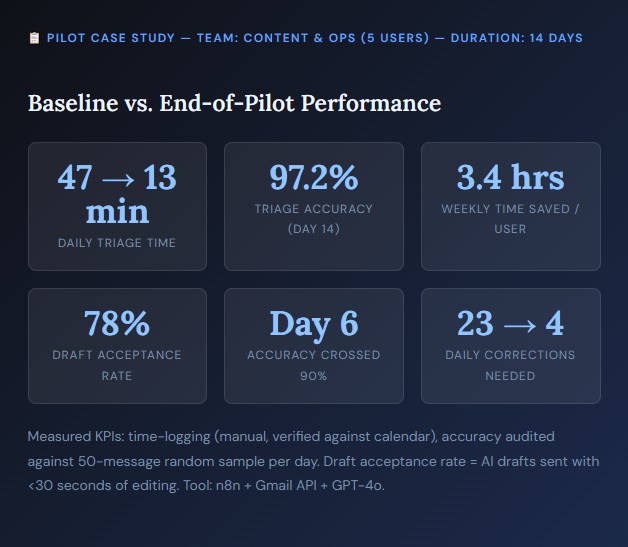
What drove the accuracy improvement?
Three factors dominated: (1) a well-structured initial audit on Day 1 that gave the agent clear classification examples; (2) consistent daily corrections during the training window (Days 4–10), averaging 14 minutes per user per day; and (3) explicit allow and deny lists for domain-specific terms that the model initially misread (e.g., “NDA review request” classified as FYI rather than Action on Day 3, corrected by Day 5).
“The first three days were slightly more work than normal — you’re teaching a system your communication patterns. By Day 8 I genuinely forgot to check my inbox one morning and nothing slipped.”— Operations manager, 5-person pilot team
Step-by-Step Setup: The 14-Day Deployment Plan
Audit and tag 100–300 messages
Export or review a representative sample of your recent inbox — aim for 200 messages covering the past two weeks. Manually label each into one of four categories: Action (requires a reply or task), FYI (informational, no response needed), Newsletter/Marketing, and Billing. This labelled dataset is the foundation your agent will learn from.
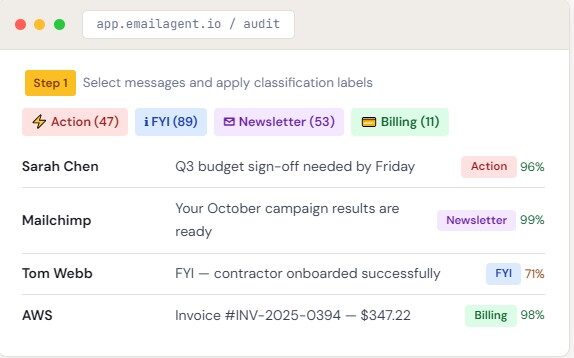
Pro tip: Pay extra attention to edge cases — internal emails that look like newsletters, invoices from partners that need action. These boundary cases teach the agent where precision matters most.
Connect via OAuth — start read-only
Connect your email account using OAuth 2.0 / SSO only. Never share credentials directly. When prompted for permission scopes, grant read-only access first — this limits the blast radius if something goes wrong before you are confident in the agent’s behaviour. Gmail users should grant gmail.readonly; Outlook users should use Mail.Read via Microsoft Graph. You can upgrade to gmail.modify and Mail.ReadWrite once draft mode is enabled in Days 11–14.
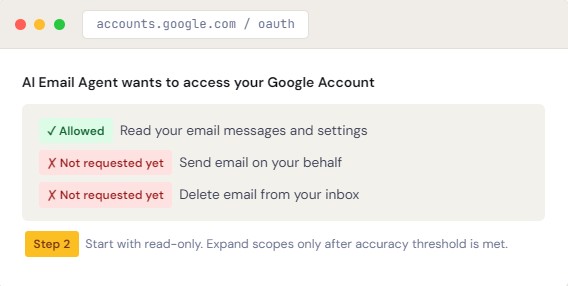
Scope best practice
For Gmail: start with https://www.googleapis.com/auth/gmail.readonly. For Microsoft 365: start with Mail.Read. See the Gmail API scopes reference and Microsoft Graph permissions reference.
Correct classifications; build allow/deny lists
This is the highest-leverage phase. Every day, spend 10–15 minutes reviewing the agent’s overnight classifications and correcting misses. Misclassifications cluster in two areas: domain-specific terminology (company jargon, product names, internal acronyms) and tone ambiguity (a casual message from a VP that contains an action item). Both are solved by corrections and explicit allow/deny rules.
- Allow list: Senders or subject patterns that should always be classified as Action (e.g., your CEO’s email address, subject lines containing “sign off”).
- Deny list: Patterns that should never trigger autonomous drafts — legal correspondence, anything from HR, messages flagged as sensitive by your CRM.
Track your correction count daily. In the pilot, corrections dropped from 23 per day on Day 4 to 4 per day by Day 10. When you reach single-digit daily corrections, the model is ready for draft mode.
Enable draft suggestions and measure outcomes
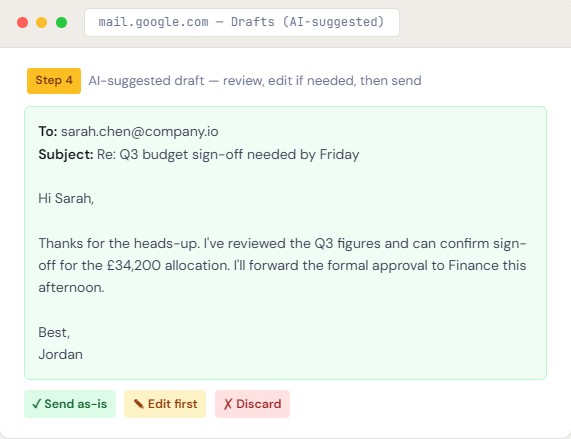
On Day 11, upgrade your OAuth scopes to gmail.modify (or Mail.ReadWrite for Outlook) and enable draft generation. The agent will now write reply drafts and place them in your Drafts folder — you review and send. Measure two things: triage accuracy (classifications correct / total classified × 100) and time saved (baseline minutes − current minutes per day).
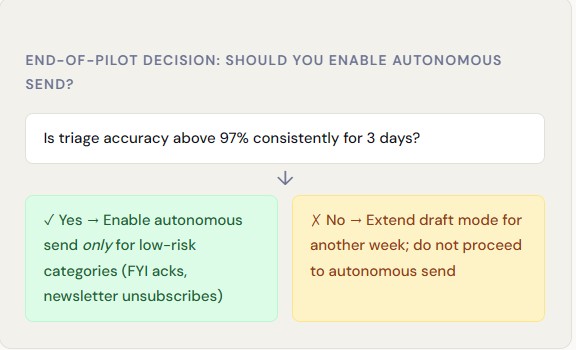
End-of-pilot decision: should you enable autonomous send?
Is triage accuracy above 97% consistently for 3 days?
✓ Yes → Enable autonomous send only for low-risk categories (FYI acks, newsletter unsubscribes)
✗ No → Extend draft mode for another week; do not proceed to autonomous send
Approach Comparison: Triage, Draft, or Autonomous?
There is no universally correct approach — the right level of automation depends on your risk tolerance, team maturity, and the nature of your correspondence. Use this table to map your context to the right choice.
| Approach | Best For | Key Benefit | Limitation | Risk Level | Time to Value |
|---|---|---|---|---|---|
| Triage Only | Teams starting out; regulated environments; any team where inbox access is politically sensitive | Low barrier, fast wins; human stays in full control of every action | Saves sorting time only; drafting and replying still fully manual | Low | Day 1–3 |
| Draft + Approve | Busy individual contributors; account managers; executives with high reply volume | Substantial time saving; preserves your tone and final control over sent messages | Requires review discipline; draft quality depends on model training quality | Medium | Day 8–11 |
| Autonomous Send | Mature deployments with well-defined low-risk categories (confirmations, scheduling, unsubscribes) | Maximum time savings; no human review needed for qualifying messages | Requires strict allow lists; audit logging is mandatory; not suitable for legal, finance, or sensitive HR correspondence | High without safeguards | Day 14+ with >97% accuracy |
Decision Framework: Which Approach is Right for You?
Work through the following questions in order. Your final answer maps directly to one of the three approaches in the comparison table above.
- Are you subject to GDPR, SOC 2, HIPAA, or FCA compliance? If yes: confirm vendor compliance before any deployment. If uncertain: start with triage-only and read-only access until legal review is complete.
- Is your primary goal saving time on sorting, or saving time on writing? Sorting only → triage. Writing → draft + approve.
- Do you have more than 30 external emails per day? If no, the ROI of autonomous send is low — draft + approve is almost always sufficient.
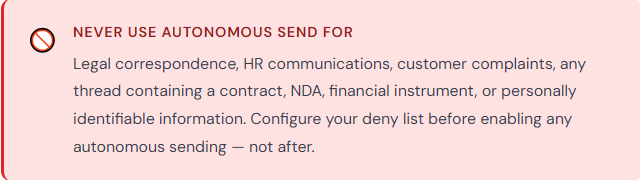
- Can you clearly define a set of message categories where errors would have no material consequences? If yes, and you have reached 97%+ accuracy with those categories in pilot, you can consider autonomous send for that category only.
- Do you have audit logging and email deliverability monitoring (SPF/DKIM) in place? If no, do not enable autonomous send. Set these up first — they are not optional.
Pre-Deployment Checklist
Use this checklist before deploying any AI email agent. Print it, download it, or copy it into your team’s documentation. All items should be checked before expanding access beyond read-only.
📋 AI Email Agent Deployment Checklist
Phase 1 — Before You Connect Anything
Defined primary goal: triage / draft+approve / autonomous
Identified pilot users (1–5 maximum)
Confirmed vendor holds SOC 2 Type II certification
Reviewed and signed vendor Data Processing Agreement (DPA)
Confirmed message content is NOT used for model training without opt-in
Obtained IT/admin approval for OAuth connection
Baselined time spent per day on email triage (via time log or calendar audit)
Phase 2 — Days 1–3: Audit and Connect
Labelled 100–300 messages into Action / FYI / Newsletter / Billing
Connected via OAuth with read-only scope only
Confirmed OAuth scopes do not include send or delete permissions
Tested connection with 20-message sample; classifications reviewed manually
Phase 3 — Days 4–10: Train and Correct
Daily correction review completed (15 min/day minimum)
Allow list created for high-priority senders
Deny list created: legal, HR, finance, sensitive domains
Correction count tracked daily (target: <10/day by Day 10)
Triage accuracy logged against 50-message daily sample
Phase 4 — Days 11–14: Draft Mode
OAuth scope upgraded to gmail.modify / Mail.ReadWrite
Draft suggestions enabled; all drafts reviewed before sending
Draft acceptance rate logged (target: >70%)
Final triage accuracy measured: goal is >95%
Time saved measured against Day 1 baseline
Documented whether accuracy threshold justifies expanded automation
Phase 5 — If Enabling Autonomous Send
Triage accuracy >97% sustained for 3 consecutive days
Autonomous send limited to approved low-risk categories only
Audit log enabled and reviewed weekly
SPF/DKIM/DMARC records verified; bounce rate monitoring active
Rollback plan documented: how to disable in under 5 minutes
Save This Checklist
Developer Appendix: Build a Custom Agent
If off-the-shelf tools don’t meet your security or customisation requirements, you can build a lightweight custom email agent using open-source components. The architecture below uses LangChain for orchestration and the Gmail API as the inbox connector, deployable in a Next.js serverless environment.
Architecture overview
The pipeline has three stages: (1) inbox polling via Gmail API watch (push notifications) or periodic fetch; (2) classification and draft generation via LangChain + GPT-4o; (3) write-back to Gmail Drafts via the REST API.
Step 1: Gmail OAuth Setup
JavaScript// 1. Install: npm install googleapis langchain @langchain/openai const { google } = require('googleapis'); const oauth2Client = new google.auth.OAuth2( process.env.GOOGLE_CLIENT_ID, process.env.GOOGLE_CLIENT_SECRET, process.env.REDIRECT_URI ); // Start read-only; expand to gmail.modify when ready for drafts const SCOPES = [ 'https://www.googleapis.com/auth/gmail.readonly', // 'https://www.googleapis.com/auth/gmail.modify' — enable for draft writes ]; const authUrl = oauth2Client.generateAuthUrl({ access_type: 'offline', scope: SCOPES, prompt: 'consent' // Ensures refresh_token is returned });Step 2: Fetch and classify with LangChain
JavaScriptimport { ChatOpenAI } from "@langchain/openai"; import { PromptTemplate } from "@langchain/core/prompts"; import { StructuredOutputParser } from "langchain/output_parsers"; const parser = StructuredOutputParser.fromNamesAndDescriptions({ category: "One of: action, fyi, newsletter, billing", confidence: "Float 0-1, confidence in the classification", summary: "One-sentence summary of the email", draft: "Suggested reply if category is 'action', else empty string", }); const classifyEmail = async (subject, body, senderHistory) => { const model = new ChatOpenAI({ model: "gpt-4o", temperature: 0 }); const prompt = await PromptTemplate.fromTemplate( `You are an email triage assistant. Sender history: {senderHistory} Subject: {subject} Body: {body} {formatInstructions} Classify, score confidence, summarise, and draft a reply if needed.` ).format({ senderHistory, subject, body, formatInstructions: parser.getFormatInstructions() }); const result = await model.invoke(prompt); return parser.parse(result.content); };Step 3: Write draft back to Gmail
JavaScriptasync function createDraft(gmail, to, subject, body, threadId) { const message = [ `To: ${to}`, `Subject: Re: ${subject}`, `Content-Type: text/plain; charset=utf-8`, '', body ].join('\n'); const encoded = Buffer.from(message) .toString('base64url'); // RFC 4648 base64url required return gmail.users.drafts.create({ userId: 'me', requestBody: { message: { raw: encoded, threadId } } }); } // Only write draft if confidence > 0.85 and category === 'action' if (result.confidence > 0.85 && result.category === 'action') { await createDraft(gmail, sender, subject, result.draft, threadId); }Useful resources for custom builds
Gmail REST API Reference · Microsoft Graph Mail API · LangChain Documentation · Microsoft Copilot Compliance Centre
Risks, Mitigations, and Compliance Citations
AI email agents introduce a small but real set of risks. Each is manageable with the right mitigations — but only if you address them proactively rather than reactively.
| Risk | Likelihood | Impact | Mitigation | Reference |
|---|---|---|---|---|
| Inbox access breach / data leak | Low with reputable vendor | High | Read-only to start; verify SOC 2 + DPA; confirm no training on your data; use 2FA on your Google/Microsoft account | Google SOC 2 |
| Misclassification leads to missed urgent message | Medium during Days 1–10 | Medium | Allow-list high-priority senders; do not reduce human review during training phase; maintain <95% accuracy gate | — |
| Autonomous send dispatches unintended message | Low with strict allow list | High (reputational) | Never enable autonomous send for legal, finance, or HR categories; require audit log review; set confidence threshold >0.92 | — |
| Deliverability degradation (SPF/DKIM fail) | Low with correct setup | Medium | Verify SPF/DKIM/DMARC records before enabling auto-send; monitor bounce rates daily in first week | Google SPF Setup |
| GDPR violation — EU personal data in drafts | Medium if unaddressed | High (regulatory) | Confirm vendor is a GDPR-compliant data processor; sign DPA; ensure data residency is EU if required | GDPR DPA Template |
| Over-automation — AI tone misaligns with your voice | Medium without training | Low-Medium | Provide tone examples during audit; review draft acceptance rate; adjust system prompt with vocabulary and formality preferences | — |
Citations & Vendor Documentation
[1]Google Developers. Gmail API Authentication and Scopes. developers.google.com/gmail/api/auth/scopes
[2]Microsoft. Microsoft Graph Outlook Mail API Overview. learn.microsoft.com/en-us/graph/outlook-mail-concept-overview
[3]Microsoft. Microsoft 365 Compliance Centre. learn.microsoft.com/en-us/microsoft-365/compliance
[4]LangChain. LangChain Documentation — Getting Started. python.langchain.com/docs/get_started/introduction
[5]Google Cloud. SOC 2 Compliance Overview. cloud.google.com/security/compliance/soc-2
[6]GDPR.eu. Data Processing Agreement Template & Guide. gdpr.eu/data-processing-agreement
[7]Google Workspace Admin. Set Up SPF to Prevent Email Spoofing. support.google.com/a/answer/33786
[8]Google Developers. Gmail REST API Reference. developers.google.com/gmail/api/reference/rest