
TikTok can be fun but sometimes you may come across people you do not want to deal with. Some users leave rude comments send unwanted messages or keep bothering you again and again.
- Block One Person on TikTok
- How to Block Accounts on TikTok in Bulk
- How to Block Someone on TikTok on iPhone
- How to Block Someone on TikTok on Android
- What Happens When You Block Someone
- How to Unblock Someone on TikTok
- Other Ways to Protect Your TikTok Account
- Table Showing TikTok Blocking Options
- Why People Block Users on TikTok
- Final Thoughts
- FAQs
- How to block someone on TikTok on iPhone?
- How to block someone on TikTok mobile?
- How to block someone on TikTok you do not follow?
- How to block someone on Facebook?
- How to block someone on Snapchat?
- How to block someone on TikTok live?
- How to block someone on TikTok will they know?
- How to block someone on TikTok 2026?
In that situation blocking is usually the easiest option.
When you block someone on TikTok they cannot see your videos send you messages comment on your posts or follow your account.
A lot of people search for how to block someone on TikTok because they want more control over who can see their content.
The good thing is that blocking someone only takes a few seconds.
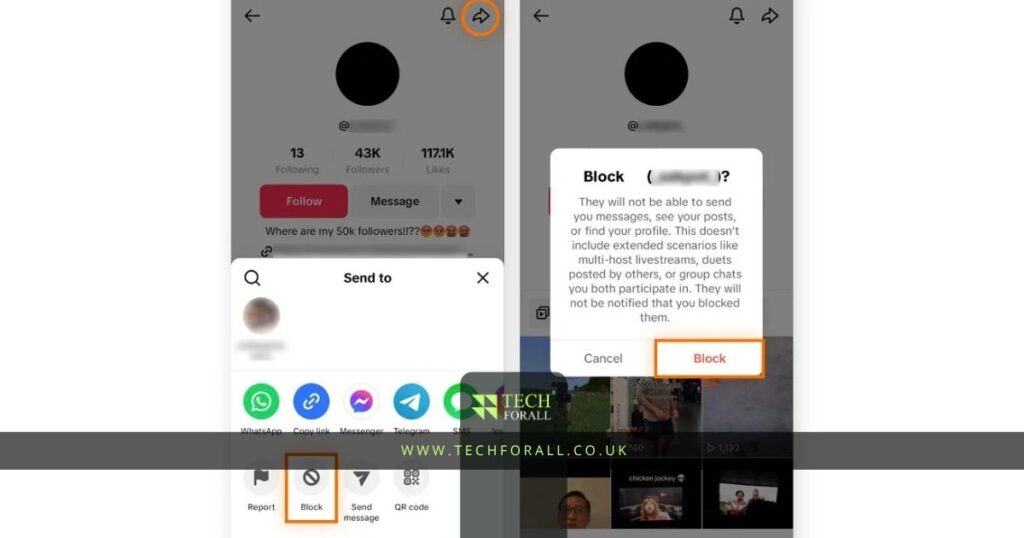
Block One Person on TikTok
If one person keeps bothering you then blocking them is simple.
Open TikTok and search for the account you want to block. Once you are on their profile tap the share icon or the three dots in the top corner.
After that:
- Tap Block
- Confirm the block
- The account will no longer be able to follow you
- They will not be able to message you or comment on your videos
This is the easiest method if you want to know how to block an account on TikTok.
Some people use this feature when someone keeps sending messages. Others use it when they keep getting rude comments or unwanted tags.
How to Block Accounts on TikTok in Bulk
Sometimes you may get spam from more than one account.
This often happens when a video starts getting a lot of views. Random people may leave rude comments or spam links.
Instead of blocking each account one by one TikTok lets you block many users together.
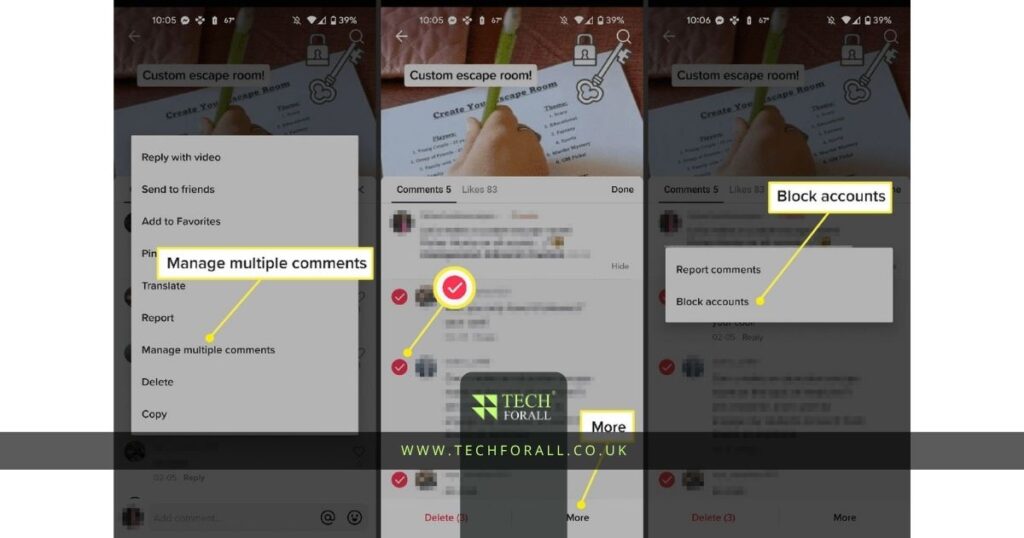
You can do this by opening the comments section on your video.
Then:
- Press and hold one comment
- Tap Manage Multiple Comments
- Select the users you want to block
- Tap More
- Tap Block Accounts
This is useful if you are dealing with fake accounts spam comments or too many unwanted messages.
How to Block Someone on TikTok on iPhone
If you use TikTok on iPhone then the process is very easy.
You do not need another app or special setting.
Just:
- Open TikTok
- Search for the person
- Open their profile
- Tap the top corner menu
- Tap Block
The same method works for most iPhone models.
Even if you are using a new iPhone the steps are usually the same.
How to Block Someone on TikTok on Android
Android users can also block people in a few seconds.
The menu may look a little different depending on your phone but the steps are mostly the same.
- Open TikTok
- Search for the account
- Open the profile
- Tap the menu icon
- Tap Block
If you cannot find the option then make sure your TikTok app is updated.
Sometimes old versions of the app may look different.
What Happens When You Block Someone
A lot of people want to know what changes after blocking someone.
Once you block a person they can no longer interact with your account in the normal way.
They will not be able to:
- Follow your account
- Send you messages
- Comment on your videos
- Tag you in posts
- See your content easily
TikTok does not send them a message saying they were blocked.
Most people only notice when they search for your profile and cannot find it anymore.
How to Unblock Someone on TikTok
Sometimes people block someone by mistake.
Other times they change their mind later.
If you want to unblock someone then TikTok gives you that option too.
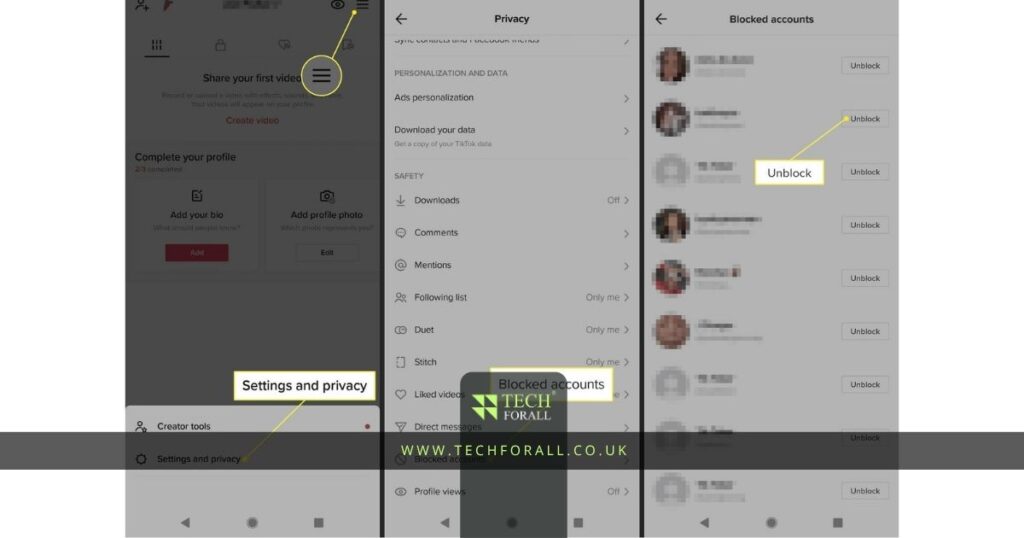
To unblock someone:
- Open TikTok
- Go to your profile
- Tap the menu icon
- Open Settings and Privacy
- Tap Privacy
- Tap Blocked Accounts
- Find the account
- Tap Unblock
After this that person will be able to find your account again.
You might be interested in: How to Repost on TikTok Easily Without Any Confusion
Other Ways to Protect Your TikTok Account
Blocking is not the only privacy option on TikTok.
If you do not want strangers bothering you then there are a few other settings you can use.
You can:
- Make your account private
- Turn off direct messages
- Limit who can comment
- Stop people from downloading your videos
- Filter rude words in comments
These settings are helpful if you want more privacy without blocking everyone.
For example if random people keep leaving rude comments then comment filters can help. If strangers keep sending messages then turning off direct messages is usually a better option.
Table Showing TikTok Blocking Options
| Feature | What It Does |
|---|---|
| Block user | Stops one person from seeing your account |
| Block multiple users | Stops many accounts together |
| Unblock user | Lets the person see your account again |
| Private account | Hides your content from strangers |
| Comment filters | Blocks rude or spam comments |
| Turn off messages | Stops unwanted chats |
Why People Block Users on TikTok
Different people block accounts for different reasons. Some people block users because of spam.
Some block people because they keep sending messages. Others block users because they do not want certain people seeing their content.
Common reasons include:
- Spam comments
- Fake accounts
- Unwanted messages
- Bullying
- Harassment
- Too many tags
- People stealing content
Blocking someone does not have to be a big deal.
Sometimes it is simply the easiest way to make your TikTok experience better.
Final Thoughts
TikTok is more fun when you can control who interacts with you.
If someone keeps sending messages leaving rude comments or making you uncomfortable then blocking them is usually the easiest option.
You can block one person block many accounts together or unblock someone later if you change your mind.
TikTok also gives you extra privacy settings like comment filters private account mode and message controls.
Once you understand where these settings are it becomes much easier to keep your account clean and avoid unwanted people.
FAQs
How to block someone on TikTok on iPhone?
Open TikTok search for the account open their profile tap the menu icon and then tap Block.
How to block someone on TikTok mobile?
Open TikTok go to the person’s profile tap the top corner menu and choose Block.
How to block someone on TikTok you do not follow?
You do not need to follow someone to block them. Just open their profile and tap Block.
How to block someone on Facebook?
Open the person’s profile tap the menu icon and choose Block.
How to block someone on Snapchat?
Open the chat or profile of the person tap the menu icon and select Block.
How to block someone on TikTok live?
During a live video tap the user’s comment or profile then choose Block.
How to block someone on TikTok will they know?
TikTok does not send them a message but they may notice later if they cannot find your profile.
How to block someone on TikTok 2026?
In 2026 the process is still the same. Open the profile tap the menu icon and choose Block.