


If you spend a lot of time on TikTok then you have probably seen the repost feature before.
- How to Repost a Video on TikTok
- How Do You Repost on TikTok
- How to Repost on TikTok on iPhone
- How to Repost on TikTok on Android
- Table Showing TikTok Repost Features
- How to Un Repost on TikTok
- How to Enable Repost on TikTok
- How to Repost on TikTok on a New Account
- How to Repost on TikTok Mobile
- Helpful Tips
- Final Thoughts
- FAQs
Reposting lets you share someone else’s video with your followers without downloading the video or posting it again on your own account.
When you repost a video it appears in the feeds of people who follow you. Your friends may also see that you reposted it.
A lot of people search for how to repost on TikTok because the repost button is not always easy to find.
The good thing is that reposting only takes a few seconds once you know where the option is.
How to Repost a Video on TikTok
If you want to know how to repost a video on TikTok then follow these steps:
- Open TikTok
- Find the video you want to repost
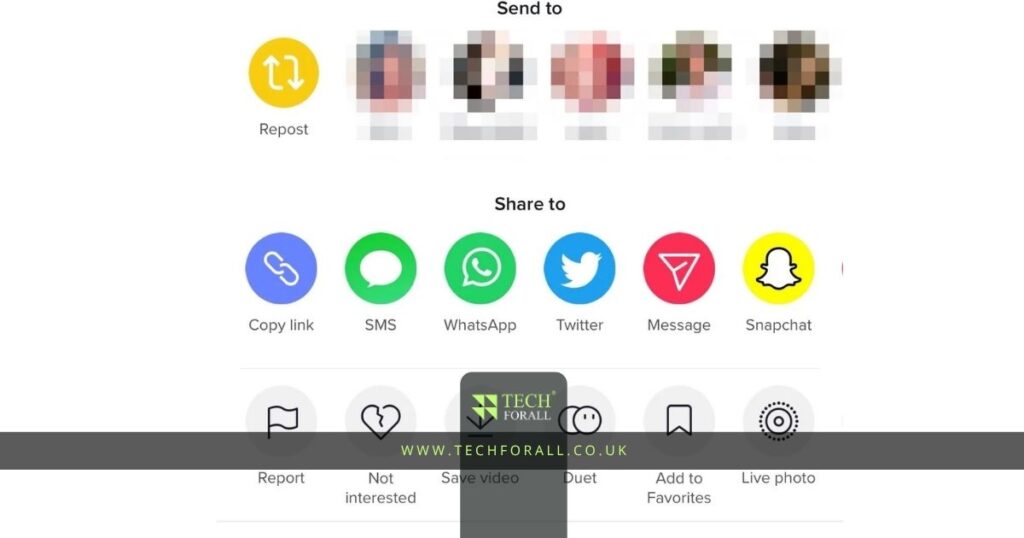
- Tap the Share button on the right side of the screen
- Tap Repost
- The video will now be shared with your followers
After reposting you may also be able to add a short comment.
For example you can write:
- This is useful
- Everyone should see this
- So true
- Very helpful
This can make your repost feel more personal.
How Do You Repost on TikTok
Many people ask how do you repost on TikTok because they do not see the repost button.
The repost option usually appears after tapping the Share button.
The Share button looks like an arrow.
If the repost button is missing then it may happen because:
- The video owner turned reposting off
- Your TikTok app is old
- The feature is not available in your area yet
- You are using a new account
In most cases updating the TikTok app can help.
How to Repost on TikTok on iPhone
If you are using an iPhone then the steps are simple.
- Open TikTok
- Find the video you want to repost
- Tap Share
- Tap Repost
The repost feature works almost the same way on iPhone and Android.
You do not need any extra app.
How to Repost on TikTok on Android
Android users can repost videos in the same way.
- Open TikTok
- Find a video
- Tap the Share button
- Tap Repost
If the repost button is missing then update TikTok from the Play Store.
Table Showing TikTok Repost Features
| Feature | What It Does | Available On |
|---|---|---|
| Repost | Shares video with followers | iPhone and Android |
| Undo repost | Removes reposted video | iPhone and Android |
| Add comment | Adds short note to repost | Some accounts |
| Share outside TikTok | Sends video to other apps | All devices |
How to Un Repost on TikTok
If you repost a video by mistake then you can remove it.
A lot of people search for how to un repost on TikTok because they change their mind later.
To remove a repost:
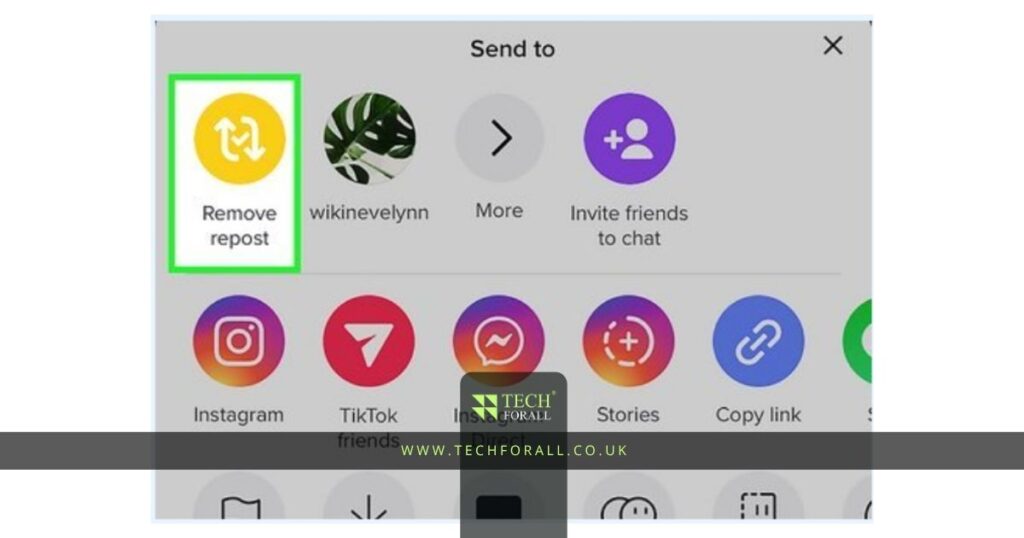
- Open the reposted video
- Tap Share
- Tap Remove Repost
After this the video will no longer show as reposted from your account.
This is also called TikTok repost undo.
You might be interested in: How to Archive an Amazon Order Easily and Successfully
How to Enable Repost on TikTok
Some people cannot see the repost option at all.
If that happens then try these steps:
- Update TikTok
- Log out and log back in
- Clear TikTok cache
- Restart your phone
- Wait for TikTok updates
Sometimes TikTok releases features slowly so some accounts get them earlier than others.
How to Repost on TikTok on a New Account
If you have a new TikTok account then you may not see the repost button right away.
TikTok sometimes limits some features on brand new accounts.
To improve your chances:
- Use the account for a few days
- Watch videos regularly
- Follow people
- Like videos
- Update the app
After some time the repost feature may appear.
How to Repost on TikTok Mobile
The repost feature works on TikTok mobile for both iPhone and Android.
You do not need a computer.
Everything can be done directly in the TikTok app.
This makes it easy to repost funny videos helpful tips news clips and trends while using your phone.
Helpful Tips
These tips can make reposting easier:
- Only repost videos you really like
- Avoid reposting too many videos in one day
- Add a short comment when possible
- Remove reposts if you change your mind
- Keep TikTok updated
Reposting too many videos can make your account feel messy.
It is better to repost only useful or interesting videos.
Final Thoughts
Learning how to repost on TikTok is simple once you know where the button is. You only need to tap Share and then Repost.
If you repost something by mistake you can remove it later in a few seconds. Whether you use TikTok on iPhone Android or a new account the repost feature works almost the same way.
FAQs
How to repost on TikTok?
Open TikTok tap Share on a video and then tap Repost.
How do you repost on TikTok?
You repost on TikTok by tapping the Share button and then selecting Repost.
How to repost a TikTok?
Open the TikTok video tap Share and then tap Repost.
How to un repost on TikTok?
Open the reposted video tap Share and select Remove Repost.
How to repost on TikTok on iPhone?
The steps are the same on iPhone. Tap Share and then Repost.
How to repost on TikTok on Android?
Tap Share on the video and then tap Repost.
How to repost on TikTok on a new account?
Use your account for a few days and keep TikTok updated.
How to enable repost on TikTok?
Update TikTok clear cache and restart the app.
What is TikTok repost undo?
TikTok repost undo means removing a reposted video from your account.


