That is why many people search how to get more storage on iphone. The good thing is that there are several ways to free space and manage iphone storage without losing important data.
Storage on an iPhone is used by photos videos apps messages and system files. Over time these files increase and the available space becomes smaller. If you learn how to manage iphone storage properly you can create more space and keep the phone running smoothly.
Ways to Get More Storage on iPhone
There are many simple methods that can help increase iphone storage. Some methods remove unnecessary files while others organize the data better.
Check what is using your storage
Before cleaning storage it helps to see what is taking space.
- Open Settings
- Tap General
- Select iPhone Storage
Here you can see which apps and files use the most space. This helps you decide where to free storage.
Remove unused apps
Many people install apps and forget about them. These apps continue to use storage even when they are not used.
You can remove apps you no longer need and free a good amount of space.
Clear app data
Some apps store large amounts of data over time. Social media apps and messaging apps are common examples.
Deleting and reinstalling these apps can clear stored data and increase iphone storage.
Delete large videos
Videos use much more space than photos. If you have large videos saved on your device you can move them to cloud storage or a computer.
This can quickly create more storage space.
Smart Ways to Increase iPhone Storage
There are also a few useful tricks that help manage storage more efficiently.
Use cloud storage for photos
Photos often use the largest amount of space. Moving photos to cloud storage can help reduce the space used on the device.
Many people use this method when searching how to get more storage on iphone for photos.
Optimize photo storage
iPhone has an option that keeps smaller versions of photos on the device while the full versions stay in cloud storage. This helps save space while still keeping your photos safe.
Manage message storage
Messages with photos videos and files can use a lot of storage. Removing old message threads can free space.
Clear browser data
Web browsers store temporary data. Clearing this data from time to time can also help free some storage.
How to Buy More iPhone Storage
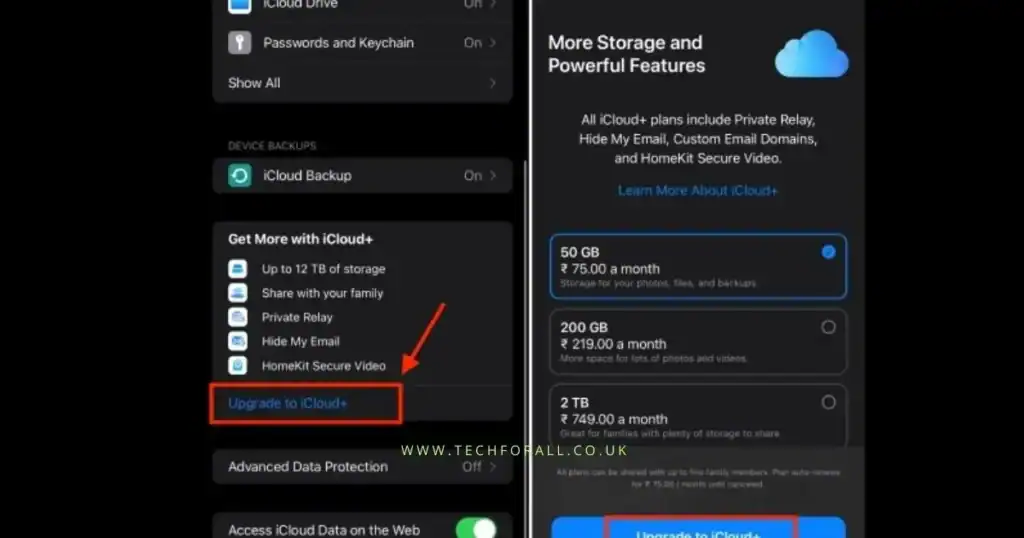
If you still need more space there is another option. You can buy extra storage through iCloud.
Many users search how to buy icloud storage on iphone because it allows them to store photos files and backups online.
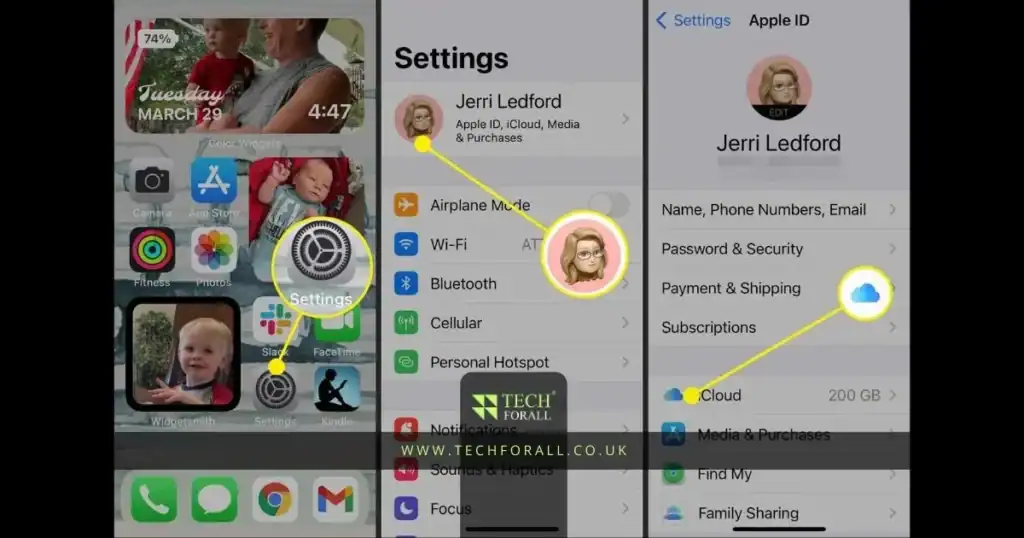
Steps to buy iCloud storage
- Open Settings
- Tap your Apple ID at the top
- Select iCloud
- Tap Manage Storage
- Choose Buy More Storage
After purchasing extra storage your files can be stored online instead of taking space on the phone.
You might be interested in: USB Device Not Recognized Simple Guide to Fix the Problem
Useful Tips for Managing iPhone Storage
These small habits can help keep your phone storage under control.
- Regularly check your iphone storage
- Remove apps that you rarely use
- Move large files to cloud storage
- Delete duplicate photos
- Clean temporary app data
Following these steps can help increase iphone storage and prevent storage problems in the future.
Many iPhone users face the same problem. After using the phone for some time a message appears saying storage is full. When storage becomes full the phone may slow down and sometimes you cannot install new apps or update the system.
That is why many people search how to get more storage on iphone. The good thing is that there are several ways to free space and manage iphone storage without losing important data.
Storage on an iPhone is used by photos videos apps messages and system files. Over time these files increase and the available space becomes smaller. If you learn how to manage iphone storage properly you can create more space and keep the phone running smoothly.
Conclusion
Learning how to get more storage on iphone can help keep your device working smoothly. By removing unused apps managing photos and organizing files you can create more space and avoid storage problems.
Regularly checking iphone storage and using simple storage management methods can help you keep enough space for apps updates and new photos.
FAQs
How to get more storage on iPhone without deleting anything?
You can move photos and files to iCloud or another cloud service to free space on your device.
How to buy more storage on iPhone not iCloud?
iPhone storage cannot be increased directly. The only option is to buy iCloud storage or use external storage.
How to get more storage on iPhone for update?
Remove unused apps and large videos then clear temporary data to create enough space for the update.
How to get more storage on iPhone for apps?
Delete unused apps and clear app data so new apps can be installed.
How to get more storage on iPhone for photos?
Move photos to iCloud or a computer and enable photo optimization.
How to buy iCloud storage on iPhone?
Go to Settings tap your Apple ID then open iCloud and select Buy More Storage.