If you have a business and want more people to find you then learning how to add business to Apple Maps can help. Many people use iPhones every day to search for shops restaurants salons clinics repair centers and local services.
- Why Apple Maps Is Important for Businesses
- What Is Apple Business Connect
- How to Add Business to Apple Maps
- How to Add My Business to Apple Maps the Right Way
- How to Claim Business on Apple Maps
- Apple Maps Register Process
- How to Get Business on Apple Maps Faster
- Business Connect Apple Maps Features
- How to Add a Location to Apple Maps
- Common Mistakes to Avoid
- Apple Maps Online and Local Visibility
- Final Thoughts
If your business is not showing on Apple Maps then you could be missing customers. A lot of business owners only focus on Google Maps and forget about Apple Maps. That is a mistake because many iPhone users open Apple Maps first when they need directions or want to find a nearby business.
The good thing is that learning how to add business to Apple Maps is not difficult. You can add your location update your details claim an old listing and make it easier for customers to find you.
Why Apple Maps Is Important for Businesses
Apple Maps is one of the most used apps on iPhones. People use it to search for places near them.
For example someone may search for:
- Mobile shop near me
- Best restaurant nearby
- Pharmacy open now
- Barber shop near me
- Car repair center nearby
If your business appears in the search results then customers can quickly:
- Call your business
- Visit your website
- Get directions
- Check your opening hours
- See photos
- Find your exact location
Even if you have a small business this can help you get more visitors.
What Is Apple Business Connect
Apple Business Connect is the platform Apple gives business owners to manage their business information.
You can use it to:
- Add a new business
- Claim an old listing
- Change your address
- Update your phone number
- Add photos
- Change opening hours
- Add your website
- Manage more than one location
Many people ask if Apple Business Connect is free.
Yes it is completely free.
You do not have to pay anything to add your business or manage your profile.
How to Add Business to Apple Maps
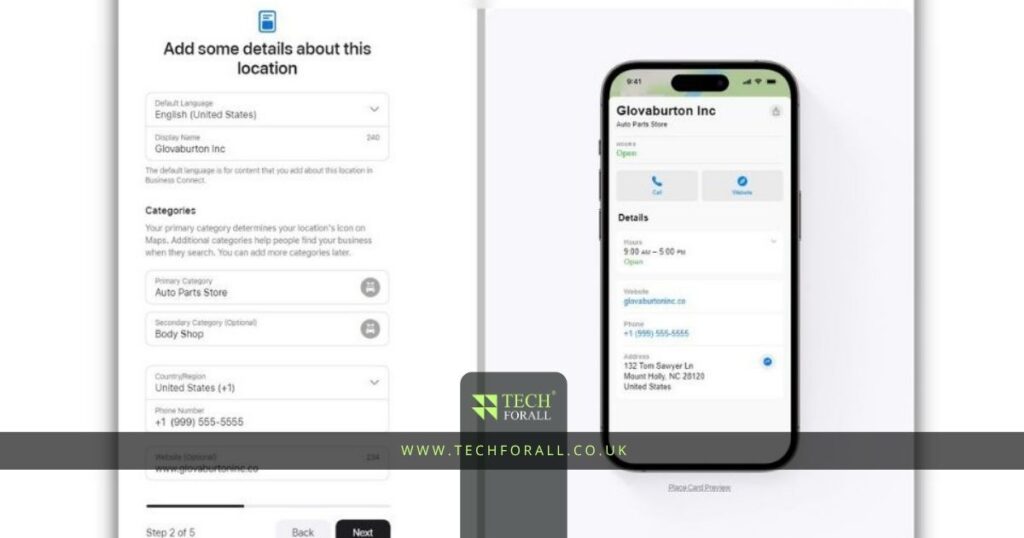
First go to Apple Business Connect and sign in with your Apple ID.
After signing in you will see the option to add your business.
You will need to enter:
- Business name
- Business address
- Phone number
- Website
- Business category
- Opening hours
Make sure all the information is correct.
Your business name address and phone number should match the details on your website and social media pages.
If the information is different in different places then Apple may take longer to approve your listing.
You might be interested in: How to Delete Cash App Account Easy and Complete Guide
How to Add My Business to Apple Maps the Right Way
When people search for how to add my business to Apple Maps they often make one common mistake.
They try to add too many words in the business name.
Keep your business name simple.
For example if your shop name is City Mobile Hub then only write City Mobile Hub.
Do not write something like City Mobile Hub Best Cheap Mobile Shop in Rawalpindi.
That does not look natural and may create problems during approval.
You should also upload clear photos of your business.
These can include:
- Front side of the shop
- Inside photos
- Product images
- Team photos
- Business logo
Photos help customers trust your business because they can see your location is real.
How to Claim Business on Apple Maps
Sometimes your business may already appear on Apple Maps even if you never added it.
This happens because Apple collects information from websites public records and other sources.
If your business is already listed then you do not need to make a new profile.
You only need to claim business on Apple Maps.
To do that follow these steps:
- Search for your business in Apple Business Connect
- Select the correct listing
- Click the claim option
- Verify that you own the business
- Update your information if needed
Claiming an existing listing is usually faster than creating a new one.
Apple Maps Register Process
After entering your details Apple will ask you to verify ownership.
This step is important because Apple wants to stop fake listings.
You may be asked to verify through:
- Phone call
- Official documents
- Website verification
Sometimes Apple may ask for extra proof if your business is new.
The process may take a few hours or a few days.
How to Get Business on Apple Maps Faster
If you want to know how to get business on Apple Maps faster then make sure your profile is complete.
Businesses with full details are usually approved more quickly.
You should:
- Use the same business name everywhere
- Add a real address
- Use a working phone number
- Add your website
- Upload clear photos
- Select the correct category
- Keep your opening hours updated
These small things can make a big difference.
Business Connect Apple Maps Features
Business Connect Apple Maps gives you more than just a simple listing.
You can also add:
- Business logo
- Cover photo
- Product highlights
- Seasonal offers
- Booking links
- Menu links for restaurants
- Updated opening hours
A complete profile looks better and helps people trust your business.
How to Add a Location to Apple Maps
If your business location is completely missing then you can add a location to Apple Maps manually.
Open Apple Maps and search for the area where your business should appear.
Then scroll down and select report an issue or add a missing place.
You will need to enter:
- Business name
- Address
- Phone number
- Category
- Website
Apple will review your request and publish the location if the information is correct.
Common Mistakes to Avoid
Many people make small mistakes when adding their business.
Some common mistakes are:
- Wrong address
- Fake phone number
- Low quality photos
- Missing website
- Wrong business category
- Duplicate listings
- Different business names on different websites
Always check your details before submitting the listing.
Apple Maps Online and Local Visibility
Apple Maps Online is becoming more important for local businesses.
When people search for nearby services on iPhones Apple Maps often appears first.
If someone searches for a mobile repair shop restaurant salon or pharmacy then Apple Maps can show local businesses with directions and contact details.
That is why a complete Business Apple Maps profile is important.
It can help more people find your business and contact you.
Final Thoughts
Learning how to add business to Apple Maps is important if you want more people to find your business.
The process is simple if your information is correct. You only need to add your business details upload photos and complete the verification process.
Once your listing is approved people can find your business more easily contact you faster and visit your location without confusion.
How to add business to Apple Maps on iPhone?
You can add your business through Apple Business Connect on your iPhone by signing in with your Apple ID and entering your business details.
What is Apple Business Connect?
Apple Business Connect is the free platform that helps business owners add and manage listings on Apple Maps.
Is Apple Business Connect free?
Yes Apple Business Connect is free for everyone.
How to add my business to Apple Maps?
You can add your business by signing in to Apple Business Connect and entering your business information.
How to get business on Apple Maps?
You can get your business on Apple Maps by creating a new listing or claiming an existing one.
How to claim business on Apple Maps?
Search for your business in Apple Business Connect select the listing and verify ownership.
How to add a location to Apple Maps?
You can add a missing location directly inside Apple Maps by using the report an issue option.
What is Apple Maps Online?
Apple Maps Online is the web version of Apple Maps where people can search for businesses and locations.